 Sellink
 Laguzzi accounting firm
Integration · CRM and ERP
Integration with your CRM or ERP: LIA adds AI to the systems your team already uses
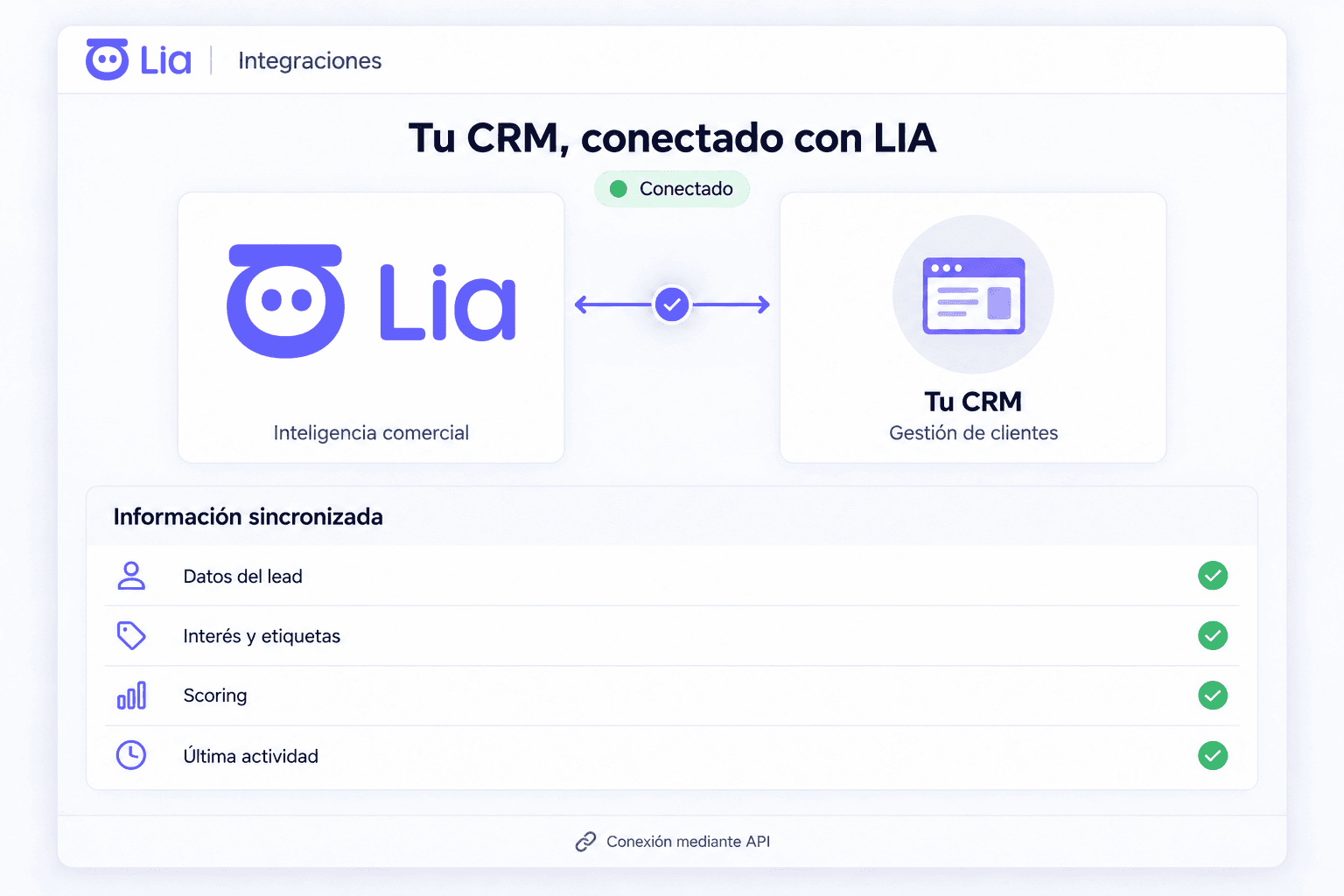
LIA works alongside the CRM or ERP your company already has, without replacing it. Every enquiry from WhatsApp, Instagram, Facebook and the web is recorded, qualified by purchase intent and synced with your system, and the manager sees each rep's follow-up. A LIA engineer sets up the connection during onboarding. If you have no CRM, LIA works as the CRM.
What LIA does with Your CRM or ERP
What LIA adds depends on the system your team already uses.
Sales CRMs: HubSpot, Salesforce, Zoho CRM, Pipedrive, Freshsales and monday CRM
If your pipeline already lives there, LIA adds what doesn't arrive on its own: each channel's conversation, qualification by intent and pending follow-up.
Chat and marketing CRMs: Kommo, Bitrix24, Clientify, GoHighLevel and RD Station CRM
If your team already sells over messaging, LIA adds supervision of each rep, alerts for leads without follow-up and real-time reports.
ERP and management: Microsoft Dynamics, Odoo, Cianbox and Sigmma
If customers and sales live in your management system, LIA takes the data it needs to respond and sends back what happened in each enquiry.
Real estate: Tokko
LIA connects with Tokko and adds the enquiries from the chat channels, with their qualification and follow-up by agent.
Excel and Google
For teams that still run on spreadsheets: LIA connects with Excel and with Google tools.
API, webhooks and Meta Conversions
A leads API to load contacts, webhooks to send events and Meta's Conversions API to report sales to Meta.
Custom connections
If your system has an API and isn't listed here, the LIA team builds the connection.
How it connects
The scope is reviewed case by case with a LIA engineer.
Your system gets reviewed
The LIA engineer reviews what the company's CRM or ERP allows and which permissions are available.
What syncs gets defined
Which data flows each way, which actions LIA runs and which events are sent via webhooks.
It gets connected and tested
During onboarding, 1 to 2 weeks with no setup fee.
- What gets synced depends on each system's capabilities and permissions.
How an existing CRM gets boosted with LIA: add AI to your CRM.
If you don't have a CRM yet: what is an AI CRM.
Other LIA integrations
They all end up in the same lead profile and the same reports by sales rep.
Corporate number through the official API and each sales rep's own number, in one inbox, with an AI that replies, alerts and calls.
What LIA doesInstagram direct messages in the same inbox as WhatsApp, answered by the AI and qualified.
What LIA doesMessages to the Facebook page land in the inbox as leads, answered by the AI, with an owner and alerts.
What LIA doesWeb chat
Your website chat handled 24/7 by the AI, by text or voice, asking for the details you choose and routing to a sales rep.
What LIA doesThe AI answers lead emails from Gmail, Outlook or any IMAP inbox, and every email is saved in the lead profile.
What LIA doesMeta lead forms
Every Facebook and Instagram lead form comes in as a lead and the AI reaches out right away.
What LIA doesPhone calls (Anura)
Click-to-call with Anura from LIA, with an extension per sales rep: every call recorded and transcribed in the lead profile.
What LIA doesGoogle Calendar
Each sales rep's calendar next to their leads, meetings booked from LIA, a WhatsApp reminder 24 h before and a follow-up 24 h after.
What LIA doesMeetings (Fathom)
With Fathom, every meeting on Google Meet, Zoom or Teams is saved in the lead profile with a summary, action items and transcript.
What LIA doesFrequently asked questions
Does LIA connect with HubSpot, Salesforce or Kommo?
Yes. LIA connects with those CRMs and with any other that has an API. A LIA engineer reviews your account and sets up the connection during onboarding.
My system isn't on the list. Can it still be connected?
Yes. LIA has a leads API and webhooks, and the LIA team builds custom connections. The engineer reviews the case during onboarding.
Do I have to drop my CRM to use LIA?
No. LIA works alongside the current CRM or ERP and adds what happens in the chat channels. If the company has no CRM, LIA works as the CRM.
What data gets synced?
It's defined during onboarding depending on the system: what information LIA can read, what data it can update and what actions it can run.
We'll show you how it would work with your team
In a demo we set up your company's case and show you what the manager sees and what each sales rep does.